


Tucker Carlson Network
4.120.00 Reviews
App Specs
- Version
- 1.102.1
- Updated On
- License
- Free
- Downloads
- 10,000+
- Developer
- Tucker Carlson Network
- Categories
- News & Magazines
- Platform
- Android
Screenshots

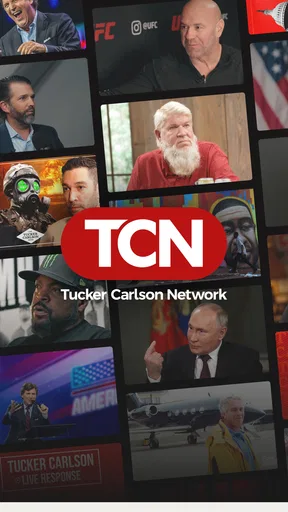

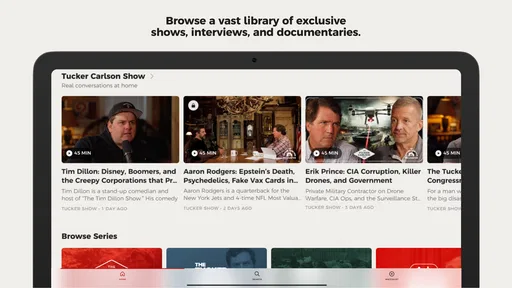
 Analysis by AppCompare
I approach Tucker Carlson Network best as a focused source for one presenter’s programming, rather than as a replacement for a general news app. That distinction matters: if you already follow Tucker Carlson, it gives you a dedicated place to look for his material; if you want a broad sweep of headlines from many outlets, a conventional news reader is a better starting point. I’d treat it as one part of a media routine, with other sources alongside it when I want more range.
A practical way to make it part of your day
My most useful routine is to decide when I want to watch, rather than opening a video feed every time I have a spare minute. For example, I might check for a new episode during a lunch break, note a topic I want to revisit, and save longer viewing for the evening. That simple habit keeps the app from becoming an endless scroll and makes it easier to choose content intentionally.
It also helps to start with a question. If a guest, event, or issue is already on my mind, searching for that subject is more efficient than browsing without a destination. I can then judge whether a result is the conversation I meant to find before settling in. This is particularly useful when I only have a short window and don’t want to spend it working out what to watch.
Choose alerts and viewing moments deliberately
Notifications are most useful when they tell me about something I genuinely want to catch. I’d begin with a restrained selection of alerts, then adjust if I find I’m missing a particular kind of update or receiving more interruptions than I need. A phone notification can be a helpful nudge, but it is not a substitute for deciding whether I have time to watch right then.
For a more considered session, I’d check the app when I’m on a stable connection and have enough time for the program I chose. That is a sensible general habit for video viewing, especially when I’m away from home and trying to conserve mobile data. I would avoid assuming that every video service offers the same offline options or playback controls; the better approach is to use only the controls that are actually visible in the app.
Who will get the most from it
This app is a natural fit for people who already seek out Tucker Carlson’s interviews and commentary and would rather go directly to a dedicated source than look across several platforms. It can also suit a curious viewer who wants to sample his work, provided they understand that the editorial focus is intentionally narrow. The developer is Tucker Carlson Network, and that clear identity is useful context when deciding how to balance its programming with other perspectives.
On the other hand, I would steer away from it as a primary choice if I wanted a neutral headline feed, a wide mix of reporters, or a quick scan of breaking news from many publishers. A news aggregator is generally better for that job. The difference is not simply a matter of interface: a presenter-led network gives you a particular voice and selection of subjects, while a multi-source app is designed to gather coverage from different organizations.
Worth Reading Before You Choose

EA SPORTS FC Mobile 26 Is a Bigger Football Game, but It Takes Time

Flipboard Shows What News Apps Must Do Beyond the Feed

Switching to Android Auto Means Rethinking Your Driving Routine

Google Calendar Makes a Crowded Week Easier to Manage

Ludo King Makes the Most of the Minutes Between Plans

Baby Panda World Brings Quick Play to Modern Phones, but Its Game Library Feels Busy
Subscriptions, access, and expectations
The app is free to install, but in-app purchases range from $8.99 to $71.99 per item, so I would check what a particular purchase includes before committing. The free download should not be confused with a promise that every program is free to watch. If I’m considering paid access, I’d first explore what I can already view, confirm the purchase terms shown in the app, and decide whether I expect to use the included material often enough to justify the cost.
It is a News & Magazines app rated for Everyone 10+, with a 4.1 average from 66 ratings, 20 written reviews, and over 10,000 installs. It was released on August 1, 2024, and version 1.100.2 requires Android 5.0 or later. Those details make it accessible to many Android users, but they don’t tell me whether its editorial approach will suit my tastes; sampling the available material is a better way to answer that personal question.
First Impressions
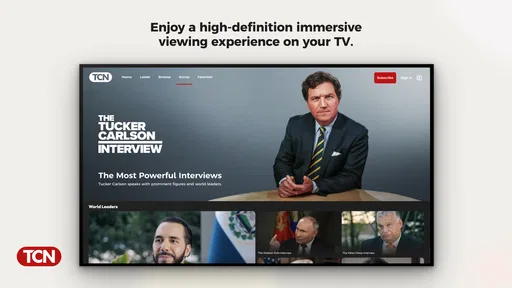
Upon firing up the app, I was met with a slick, user-friendly interface that’s both visually appealing and easy to navigate. The design is clean, with a modern touch that makes browsing content feel like a breeze. Everything is laid out intuitively, so even if you’re not the most tech-savvy person, you should find navigating it pretty straightforward.
Content Galore
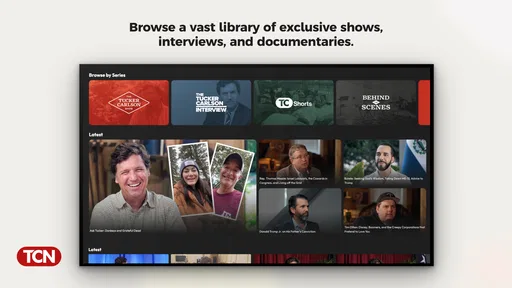
The Tucker Carlson Network isn’t just about streaming his latest shows. Oh no, it’s much more than that! You get a full package: past episodes, exclusive content, interviews, and even behind-the-scenes glimpses. It's like having an all-access pass to Tucker's world. The app also features a variety of categories, so whether you're interested in politics, culture, or just some good old-fashioned commentary, there’s something for everyone.
One thing I really appreciated was the search functionality. It’s robust and super responsive, allowing you to find episodes or content related to specific topics or guests quickly. No more endless scrolling!
User Experience
Let’s talk about how the app performs. I’ve used it on both Android and iOS, and the experience is consistent across the board. The streaming quality is top-notch, with minimal buffering even on a mediocre internet connection. Videos load swiftly, and the playback is smooth as butter. The developers have clearly put in the work to ensure that users get a seamless experience.
Notifications are also a thing here, but don’t worry—they’re not overbearing. You can customize them to alert you about new episodes, live streams, or special segments. It’s nice not to be bombarded with alerts every five minutes.
Community and Interaction
What really sets this app apart is its community aspect. There’s an in-app feature where you can engage with other viewers, share opinions, and even partake in live discussions. It’s like being part of a virtual talk show audience. These interactions add an extra layer of depth and make the experience more immersive.
However, like any community-driven feature, it can get a bit heated at times. But hey, that’s part of the excitement, right? As long as you keep it respectful.
Final Thoughts
All in all, the Tucker Carlson Network app delivers what it promises. It’s a comprehensive hub for fans and newcomers alike who want to keep up with Tucker’s latest takes on the world. While it might not convert everyone into a fan, it definitely provides a platform where his current audience can engage deeply with his content.
If you’re someone who’s looking for a reliable, user-friendly app that offers a wide range of content and a chance to engage with a community, this app might just be worth your time. So, go ahead, give it a whirl and see what the fuss is all about!
My verdict after settling into a routine
With a 4.1 average, the app appears to have found an audience, though ratings alone can’t tell me whether its style or selection will fit a particular viewer. I’d use them as a small signal of general reception, not as a substitute for trying a few programs. The best test is whether the topics and presentation hold your attention after the novelty of a dedicated app wears off.
For me, the strongest reason to keep it installed is convenience: a focused home for programming I already want to follow. Its main trade-off is the same focus. People who enjoy hearing one host develop an argument across interviews and commentary may value that continuity; people who prefer an editorial mix will likely feel constrained. I’d recommend it to the former, while suggesting the latter start with a multi-outlet news service and use this only if they want Tucker Carlson’s perspective specifically.
Small habits that make the experience clearer
I’d use search as a way to follow a subject across available material, not as proof that the app covers every side of that subject. A search result is a route to relevant programming, not a balanced reading list. When a topic matters to me, I make a note of the claims or questions raised and check them against reporting from other sources afterward. That keeps the app useful without asking it to do a job it is not designed for.
Likewise, I would separate watching from participating. The community features can add a social layer, but joining a heated discussion while trying to understand a complicated issue can pull attention away from the program itself. I’d watch first, then decide whether I have anything constructive to add. If the conversation feels more combative than informative, simply leaving it alone is a perfectly reasonable way to use the app.
What to check before you rely on it
If you’re choosing between this and a general news app, think about what you need at that moment. For a quick overview of several developing stories, a headline aggregator is more efficient. For a longer interview or a particular commentator’s analysis, this dedicated app is more direct. I wouldn’t expect it to replace a newspaper, a wire service, or a collection of local news sources; each serves a different purpose, and combining them is often more useful than trying to make one app cover everything.
Before making a purchase, I’d read the offer shown on the purchase screen carefully and check whether it matches my intended use. The listed price range runs from $8.99 to $71.99 per item, a substantial span, so it is worth understanding the specific item rather than treating all paid access as interchangeable. I’d also make sure I’m comfortable with recurring or one-time terms displayed at checkout before confirming anything.
As an everyday example, imagine I hear a short mention of an interview while commuting and want to watch it later. I can wait until I’m home, search for the guest or subject, and choose a suitable program rather than trying to stream on a patchy connection or browse while distracted. If I then want a fuller picture of the issue, I can turn to other outlets for context. That workflow makes the app a useful destination, not my only source of news.
Who should pass, and who should keep it
I’d skip it if I rarely watch long-form commentary, want a feed built around multiple editorial viewpoints, or mainly need quick text updates. In those cases, its focused video-centered appeal may not justify another app on the phone. I’d also be cautious about joining its discussions if I prefer low-conflict spaces; the option to participate does not mean every conversation will be rewarding.
If Tucker Carlson’s programming is already part of what you watch, though, the app offers a straightforward way to find related material and keep it separate from the noise of a broad social feed. My recommendation is to try the free app, explore the material that is available to you, set alerts sparingly, and only consider a purchase after checking its exact terms. Used with that modest routine and a habit of consulting other sources, it can be a practical specialist addition to a news diet—not a universal answer to it.
Pros
- User-friendly interface
- easy to navigate.
- High-quality video streaming available.
- Exclusive content not found elsewhere.
- Regular updates with new features.
- Offline viewing mode is a plus.
Cons
- Limited content outside main topics.
- Requires subscription for full access.
- Occasional buffering issues reported.
- Notifications can be overwhelming.
- No support for older device models.
FAQs for Tucker Carlson Network
What content is available on the Tucker Carlson Network app?
The Tucker Carlson Network app provides access to a wide range of content related to Tucker Carlson's shows, including full episodes, exclusive interviews, and behind-the-scenes footage. Users can also find articles, commentary, and clips from his broadcasts. The app aims to deliver comprehensive coverage of Carlson's perspectives and topics he covers.
Is the Tucker Carlson Network app available on both Android and iOS?
Yes, the Tucker Carlson Network app is available for download on both Android and iOS devices. It can be found on the Google Play Store for Android users and the Apple App Store for iOS users. The app is designed to be compatible with most smartphones and tablets running current operating systems.
Does the app require a subscription or is it free to use?
The Tucker Carlson Network app offers both free and premium content. While some features and episodes can be accessed for free, a subscription may be required to unlock full access to all content, including exclusive interviews and ad-free streaming. Subscription details and pricing are available within the app.
What are the key features of the Tucker Carlson Network app?
Key features of the app include on-demand streaming of Tucker Carlson’s shows, personalized notifications for new episodes, and offline viewing capabilities. Users can also create watchlists and enjoy an ad-free experience with a premium subscription. The app's user-friendly interface makes navigation and content discovery seamless.
How can I provide feedback or report issues with the app?
Users can provide feedback or report issues directly through the app under the 'Support' or 'Contact Us' section. This feature enables users to send messages or report bugs, ensuring that the development team receives valuable insights and can address any technical problems promptly. User feedback is crucial for app improvements.


